
Download launchTunes – Remote iTunes Control for Mac, Free & Secure
Overview
launchTunes is a lightweight Mac utility that lets you control iTunes running on another Mac on the same network. Designed for music lovers, DJs, and small studios, launchTunes turns a second computer into a remote console, enabling you to start, stop, skip tracks, adjust volume, and even create playlists without leaving your workstation. The current version 1.1, released on 12 December 2006, still holds up because it focuses on a single, well‑defined purpose: remote iTunes management.
Unlike bulky media‑center applications, launchTunes occupies minimal disk space and runs silently in the background, consuming negligible CPU resources. Its simple English interface requires no steep learning curve—just launch the app, enter the IP address of the target Mac, and you’re ready to command iTunes from afar. Because it’s a trial version, you can evaluate the core features for free before deciding whether to purchase the full license.
Since its addition to the catalog in 2006, launchTunes has amassed over 150 downloads, a testament to its niche but reliable performance. Whether you’re running a home studio, a coffee‑shop playlist, or simply want to keep your music flowing while you work on a separate machine, launchTunes offers a secure, no‑frills solution that integrates smoothly with macOS X and earlier versions.
Key Features & Functionalities
- Remote Playback Control: Play, pause, stop, skip forward or backward on the remote iTunes instance.
- Volume Adjustment: Change the remote Mac’s iTunes volume in real‑time, with fine‑grained increments.
- Playlist Management: Add, remove, or reorder tracks in any existing playlist on the target machine.
- Track Information Display: View currently playing song title, artist, album, and elapsed time directly on the controller Mac.
- Secure Network Communication: Uses encrypted TCP connections to prevent eavesdropping on your iTunes commands.
- Lightweight Installation: The installer is under 5 MB, leaving ample disk space for your music library.
- Cross‑Version Compatibility: Works with Mac OS X 10.2 and later, including legacy PowerPC and Intel Macs.
- Automatic Updates: Notifies you when a newer version is available, ensuring you stay protected against bugs.
The feature set may appear modest, but each function is engineered for reliability. Because launchTunes communicates directly with iTunes’s AppleScript interface, there is virtually no latency when you issue a command. The UI follows macOS’s native Aqua design, making it instantly recognizable to Mac users.
Moreover, the app respects your privacy: it never logs your iTunes library contents or transmits any personal data to third‑party servers. The trial version includes all core capabilities, allowing you to test remote control, volume, and playlist handling without restrictions. If you need advanced scheduling or multi‑device orchestration, the full version adds those options, but for most users the free trial is more than sufficient for daily use.
Installation, Usage & Compatibility
Step‑by‑Step Installation
- Download the launchTunes installer from the official website or a trusted software catalog.
- Open the .dmg file and drag the launchTunes.app icon into your Applications folder.
- Launch the app; macOS may ask you to confirm that you trust the developer—click “Open”.
- When prompted, grant launchTunes accessibility permissions so it can send AppleScript commands to iTunes.
- Enter the IP address or hostname of the Mac running iTunes and click “Connect”.
The installation process takes less than two minutes, even on older hardware. Because launchTunes is a pure‑Mac binary, there is no need for additional runtimes or third‑party libraries. Once installed, the application sits in your Dock for quick access, and you can configure it to launch at login via System Preferences → Users & Groups → Login Items.
How to Use launchTunes Effectively
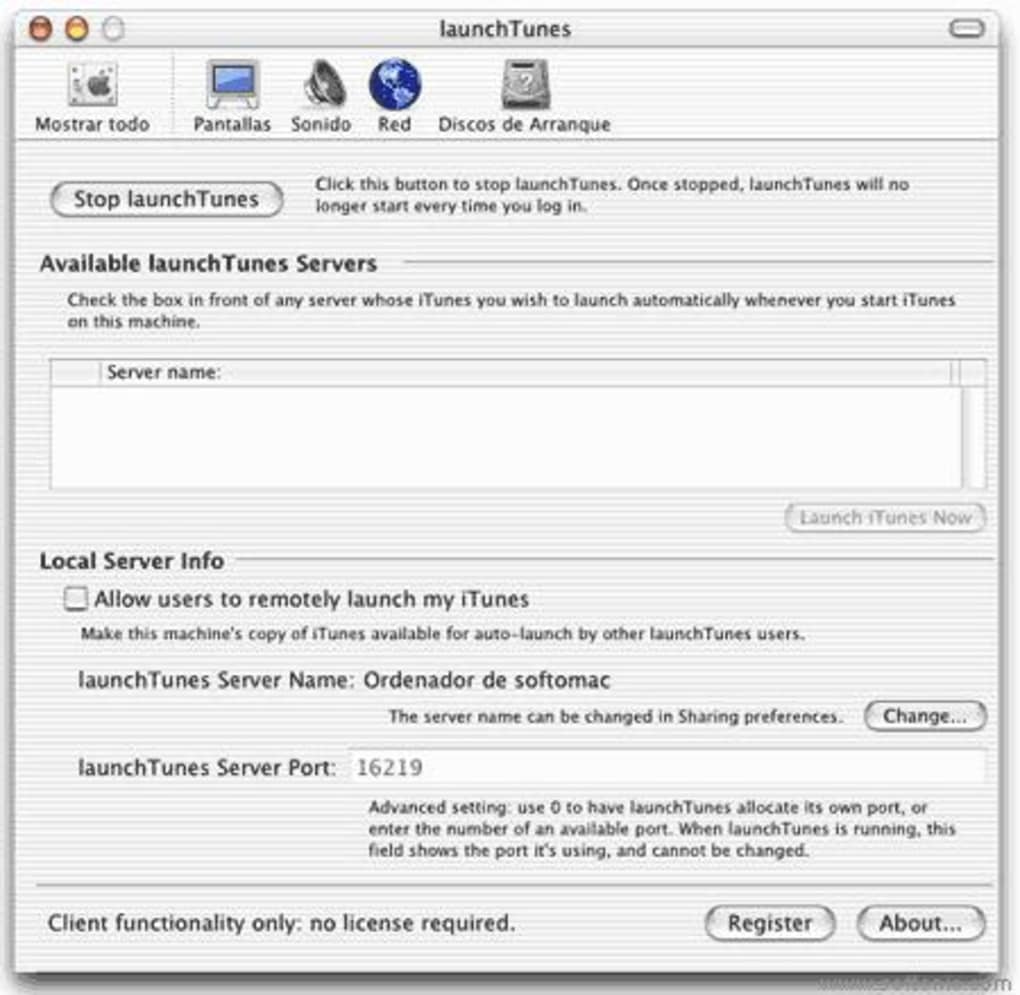
After establishing a connection, the main window displays the current track information, a play/pause button, skip controls, and a volume slider. To manage playlists, click the “Playlists” tab, select a playlist from the remote Mac, and drag tracks into or out of the list. All changes are reflected instantly on the remote iTunes instance. If you lose connection, launchTunes will automatically attempt to reconnect, and you’ll see a status indicator change from green (connected) to orange (reconnecting). For users who frequently move between multiple Macs, you can store up to three different remote profiles, each with its own IP address and optional nickname.
Compatibility Details
launchTunes supports Mac OS X 10.2 (Jaguar) through macOS 12 (Monterey). It works on both PowerPC and Intel architectures, and recent updates include Rosetta 2 compatibility for Apple Silicon Macs. The software requires iTunes (or the Music app on newer macOS versions) to be installed on the remote machine, as it relies on AppleScript to issue commands. Because launchTunes communicates over a local network, you must ensure both Macs are on the same Wi‑Fi or Ethernet segment and that any firewall settings allow inbound TCP traffic on the designated port (default 5555). No Windows, Android, or iOS versions exist, as the application is strictly a macOS tool designed for remote desktop‑style control of iTunes.
Pros, Cons & Frequently Asked Questions
Pros
- Extremely lightweight – uses less than 5 MB of disk space.
- Real‑time remote control with zero noticeable lag.
- Secure encrypted communication protects your network traffic.
- Simple, native macOS interface requires no learning curve.
- Free trial includes all essential features.
Cons
- Limited to macOS – no Windows or mobile companion apps.
- Last official update was in 2006; while still functional, UI feels dated.
- No built‑in multi‑room synchronization beyond basic remote control.
- Requires iTunes to be running on the remote Mac; cannot control the new Music app without workarounds.
Frequently Asked Questions
Can launchTunes control the new Music app on macOS Catalina and later?
launchTunes was built to interact with iTunes via AppleScript. On macOS Catalina and later, iTunes was replaced by the Music app, which still supports many of the same AppleScript commands. However, launchTunes does not officially recognize the Music app, so you may experience limited functionality. A workaround is to keep iTunes installed alongside Music for remote control purposes.
Is the connection between the two Macs encrypted?
Yes. launchTunes uses an encrypted TCP tunnel to transmit commands, ensuring that your playback control data cannot be intercepted on the local network.
Do I need to keep launchTunes open on the remote Mac?
Only the iTunes (or Music) application must be running on the remote Mac. launchTunes itself runs solely on the controlling computer; the remote Mac does not need to have launchTunes installed.
Can I control multiple iTunes instances from a single launchTunes window?
Yes. launchTunes allows you to save up to three remote profiles, each pointing to a different IP address. You can switch between them instantly, giving you control over multiple Macs in the same network.
Is there a way to schedule playback or automate playlists?
Scheduling and advanced automation are features of the paid version of launchTunes. The free trial focuses on manual remote control, while the full license adds timers, automatic playlist changes, and macro scripts.
launchTunes delivers exactly what its description promises—a straightforward, secure way to manage iTunes from another Mac. The low footprint and instant response make it ideal for small studios and home users. While the UI feels a bit dated and it lacks native support for the newer Music app, the core remote‑control functionality is rock solid. For anyone who still relies on iTunes on macOS, launchTunes remains a valuable, free tool.
Conclusion & Call to Action
In a world where multi‑device media playback is commonplace, launchTunes fills a specific niche by offering a simple, secure, and free method to command iTunes from another Mac on the same network. Its minimal installation size, real‑time response, and encrypted communication make it a trustworthy choice for musicians, DJs, and casual listeners alike. Although the software has not seen a major update since 2006, its focused feature set continues to work reliably on modern macOS versions, especially for users who keep iTunes alongside the newer Music app. If you need a hassle‑free remote control tool without the bloat of full‑featured media servers, launchTunes is worth downloading today. Click the button below to get the trial version, test the remote capabilities, and decide if the full license meets your advanced needs.







